
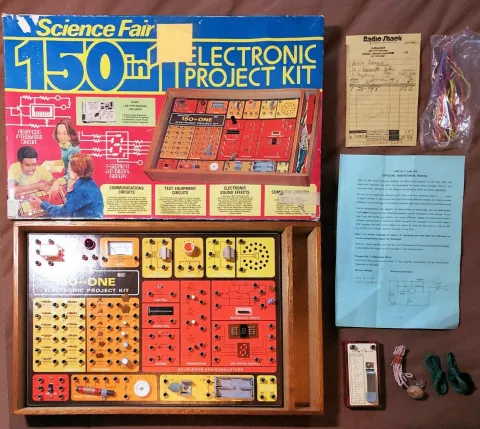
I'm a maker. I've always been one, long before that became a term. I always has some project going, starting with the 150 in 1 Electronic Project Kit from Radio Shack. That was my “gateway drug” to making. Along the way, I ended up going around the neighborhood looking for tube tv's that had been put on the curb to see if I could get them working again (ask me about the 3kV transformer lead that I briefly touched while adjusting the focusing ring on the main crt!), learning how to tear down and rebuild Briggs and Stratton lawn mower engines, building plastic scale models and being taught the basics of car mechanics by my dad. Shop class in Junior High, and then in High School, writing computer programs. Later on, I would learn how to sew, build and fix PC computers and build websites.
I've seen things you people wouldn't believe. Attack ships… Oh, sorry, where was I? Oh yes, I was there at the beginning of the modern internet, when Google was still hosted at Stanford University. I've used dial-up modems in speeds from 110 baud to 56k. At one point, I had a 19" telco rack with 24 port Cisco 100Mbit/s ethernet switch and a 56k frame relay line in my basement. I've started a small ISP and took Avi Freedman out for sushi (trust me, don't do it unless you've got a high limit on your credit card!). Along the way, I've become very picky about what I use, both digitally and physically.
On this page, I will talk about them, and why I like them. So sit back and enjoy the ride!
Digital Tools
Putting things on the internet is how I pay the bills these days, so let's talk about the digital tools I use, and why I've come to like them. You don't have to agree with me, this is just what my preferences are. Everybody is different.
Vi!
Emacs!
Tab!
Spaces!
Ok, now that we've gotten that out of the way, let's move on!
Website Creation & PHP Development
I have a love/hate relationship with Apple. I love MacBook Pro's for my development work and even everyday computer needs, but have no desire to own an iPhone or iPad. For my mobile devices, I'm an Android guy.
When I'm not working a long term contract with a company that provides equipment, I currently use a 16" MacBook Pro with a 2.4 GHz Intel i9 CPU, 32 GB of RAM and a 1TB SSD.
Why do I prefer the MacBook Pro's for my development work? There are a number of reasons. First and foremost, they just work. Yes, I know the arguments, “walled garden” and all that. But I've reached the stage in life that I just want things to work without having to futz with them.
Second, because 99%+ of my development work is using Open Source tools, languages and software, having macOS being built on top of BSD Unix makes it trivially easy to install what I need using Homebrew. Currently, I have Nginx, Mariadb, memcached, Mongodb, redis and 6 different PHP-FPM's (7.4, 8.1, 8.2, 8.3 and 8.4) running.
I have so many different version of PHP-FPM running because I work on a variety of projects that all need different versions. Using the combination of Nginx and PHP-FPM, in the configuration for a particular site, I specify which socket to use, and each version of PHP-FPM is configured to use a different socket.
I also run all my normal Mac programs as well – Email, IDE, 6 different messaging apps, 2 or 3 different web browsers, and even Photoshop and Illustrator. I will admit, with both Photoshop and Illustrator open, things do lag a bit. 😀
Yeah, yeah, I know, Mac's are expensive. That's why I buy refurbished ones, and I'm using 6 year old MacBook instead of a shiny 16" M4 Pro MacBook Pro with 48GB of RAM and a 2TB SSD. Do I want that M4 Pro MacBook Pro? Oh yes I do. But I can't afford it. But there's probably a M2 Pro or Max one in my future.
My daily “driver”
There are two main tools that I use when I'm writing code. I spend the most time in PHPStorm from Jetbrains. I was first introduced to PHPStorm in 2016 when I started working at Turner Broadcasting (later on it became WarnerMedia and then Warner Bros. Discovery). To me, it's just the perfect editor for PHP. It understands PHP at a fundamental level, and while the engine underneath it all is Jetbrains' Intellij editor, it feels like it was designed from the ground up for PHP, javascript and jQuery. The syntax highlighting, how it matches up the braces, knows about various different PHP frameworks like Laravel, Drupal and Symfony, in my opinion, makes it the best choice for working with PHP and related web based languages. I was so impressed with it, within weeks of starting to use it at Turner, I purchased a personal license as well. Every release gets better and better, addressing a pain point that I didn't even know I had!
When I need to do a lot of text manipulation, be it large JSON objects or having to turn a long line of items into rows, my goto is Sublime Text. It's Apple's TextEdit on steroids. It's even possible to use it as your primary editor for a lot of languages. The PHP and Drupal support isn't quite where I need it, but if it ever gets to that point, it's going to be a tough decision. Sublime Text is one of the most configurable and extensible text editors I've ever seen. It can be a Vim or Emacs clone if those are the keyboard commands you have the muscle memory for. There are plugins available to do any number of different things, but the ones that I use the most are the beautifiers and the minifiers. This is another one that after using it for a bit, that I purchased a personal license for.
There are other editors out there. These are mine. Your mileage may vary.
My editor/IDE
Over the past couple of months, I have discovered that when used responsibly, genAI can be a boon to the software developer. There are a few key concepts that will help you use it as a tool and not a crutch. It really boils down to treat it like you would a very junior developer you were mentoring. Tell it (not ask, tell) when you want it to do, provide information on the environment (unless you are using one of the newer ones that integrate with your code base), and most importantly, check it's work! I can't emphasize that enough. Don't just blindly use the code that it provides. Examine it like you would during a code review that was submitted by a junior developer. Use it to do the grunt work, including the first round or two of troubleshooting a problem.
My first foray into using genAI was with Google Gemini, then I tried a PHPStorm plugin that would let you use a number of different LLMs, including Gemini. From there, I tried Charm Crush. That one was interesting, but I ran up against rate limits, the the pricing model wasn't very affordable, so I moved on from there. Currently, I'm trying out Junie, which is the AI agent that Jetbrains recently added to all of it's IDE's. It's a combination of a local LLM that learns your code and ChatGPT-5. It's been doing a pretty decent job, and it seems to be afforable. I may try GitHub's CoPilot if there's an integration with PHPStorm.
Here are some recent prompts I've used with Junie while building this site:
- For this request only, do not make any changes to files. There is a page with about 12 paragraphs that loads quickly, yet when I try and edit the node, it takes a very long time for the edit page for that node to finish loading. Troubleshoot the problem, and suggest possible ways to mitigate this. Do not change any files for this request only
- Troubleshoot why when the site footer is set to a fixed size and body has the bottom margin set to the same size, that page content is being rendered behind the footer
- This site uses Bootstrap 5 for a responsive layout. When the screen size is less than 992px, the navigation collapses and a hamburger is shown. In this layout, the hamburger is pulled to the right, but when it is clicked to show the menu, it shifts to the left. The hamburger should not move when it is clicked. Troubleshoot this issue
As you can see, in each instance, I told Junie exactly what I wanted her to do. In each case, she came up with reasonable solutions. When she is allowed to change code, depending on how you have her configured, she will either ask permission before editing each file, or give you the chance at the end to review diffs of the changes made and roll them back if you want.
I've even used genAI to create graphics for websites. I've found that Google Gemini does the best when it comes to images and graphics for websites, but it does have it's quirks with are easy to deal with. The biggest reason that I continue to use Gemini is that they seem to be the most ethical when it comes to image creation. Again, you need to be very specific, but you are able to have it refine the image it just created.
I used to be in the “I'm not sure about genAI, but I haven't made up my mind” camp. Now I'm firmly in the “Used responsibly, genAI can be a useful tool in a developers toolbox.” Just don't forget to review the results closely, so you don't start using it as a crutch.
Above all else, the most important thing about using genAI when it comes to code and image creation is not to hide it. If you used it to create images for a website, say so on an About page, for example. When it comes to code, be sure to mention it during code reviews and stand ups if you're working for somebody, or the client if you are freelancing. Remember, don't hide it, and use it as a tool, not a crutch.
Generative AI
Photoshop and Illustrator are the gold standard when it comes to image creation and editing. I am by no means an expert when it comes to either one of these, or can even call myself a designer. But I was taught by an expert, and consider myself an experienced “graphics technician”. I'm not very good at using them to create anything more than simple graphics, but I'm pretty good on using them for things like resizing, manipulations such as changing the color of elements, combining images (or parts of them), opacity and format conversions. Photoshop is overkill when it comes to simple image resizing, format conversions, image rotation, and resizing. I can do all of that except resizing directly from the Finder on my MacBook, and for resizing, I can using Preview.
If you can't afford Photoshop or Illustrator, there are a number of low cost and free alternatives out there. Some of them have been reported to be just as good, if not better, but I have not tried them. I have an Adobe Creative Cloud subscription because there are other tools that I need that I haven't found decent replacements for. In the future, I may try some of them out, because the Creative Cloud subscription is not the what could be called affordable, even with my grandfathered price. It would be great if I could drop that subscription.
Adobe Photoshop and Illustrator
It goes without saying that using web browsers during the creation phase is critical. I check my work in four different browser and keep them open so they are available. It's critical that you check your work in all of them so you can make adjustments for the user experience is the same or nearly the same in all of them. If you check in these four browsers, you'll probably cover close to 90% of of your visitors. After you're done with the site, you can then double check browsers some of the less mainstream ones. The four browsers that I check my work in regularly are
- Google Chrome
- Apple Safari
- Microsoft Edge
- Firefox
Chrome and Safari are the gorillas in the room, with 80% of the browser use between them. Edge actually beats out Firefox and seems to be trending upwards. It's always good to keep an eye on the percentage of usage, because is possible that Opera might overtake Firefox some point in the future.
Web Browsers
If you consider yourself a professional developer, source control is critical. In my opinion, it's the best way to limit how much of your work you might lose if you have a catastrophic failure. That means both a local repository, and a remote on. Again, in my opinion, the git and Github combination is hard to beat. Even with a free Github account, you can have private repositories and even create organizations.
Commit your code early and often. I'm a very methodical and iterative developer, so after each iteration, if I like the results, I will do a local commit. If I don't like the results, I'll just roll back to my last commit. This process works well for me. Like everything else, your mileage may vary.
You should push your changes up to Github when you've finished working on the website or coding project at a minimum. More often is better, especially if you're putting a lot of hours in every day. You really don't want to have to recreate 10 or 12 hours of work. Right now, I randomly push throughout the day, but I'm considering creating a script that I can start when I start work on that project and will do an hourly checkpoint commit to make sure that at most, I lose an hour of work.
Remember, commit early and commit often. Push frequently to minimize how much of your work could be lost.
Git and Github